What does collate on printer mean? It’s more than just a printing term; it’s the secret sauce that makes multi-page documents neat and tidy. Imagine cranking out a stack of reports where each set of pages is neatly organized, instead of a chaotic jumble. That’s the magic of collating, and it’s a game changer for anyone dealing with paperwork.
Collating in printing refers to the process of arranging printed pages in the correct order. When you hit that collate option on your printer, you’re basically telling it to stack pages in sets instead of a mixed mash. This becomes especially helpful in scenarios like printing multiple copies of a report, ensuring that each copy is not only complete but also easy to follow.
Definition of Collate in Printing
In the realm of printing, “collate” means to arrange multiple copies of a document in a specific order. Imagine a chaotic stack of papers, akin to a jigsaw puzzle missing half its pieces. Collating takes those loose pages and organizes them into neat sets, ensuring that each set is perfectly in sequence—like a well-rehearsed dance routine where every step is synchronized to perfection.Collating affects the printing process by streamlining how documents are prepared for distribution.
Instead of receiving a confusing heap of papers, you get organized bundles that are easy to hand out, file, or reference. This not only saves time but also reduces the risk of errors—because nobody wants to read from the wrong page of an important presentation.
Benefits of Collating for Document Management
Collating is a superhero in the world of document management, swooping in to save the day when it comes to organization. It’s especially beneficial in scenarios where multiple copies of a document are needed, and simplicity is key. Consider the following situations where collating shines brighter than a new shiny penny:
- Presentations: Imagine you’re at a meeting, and you need to distribute handouts. Collating ensures each participant receives a complete and ordered set, making you look organized and professional—like the office wizard you were meant to be.
- Reports: When delivering reports to clients or stakeholders, collating keeps your information structured. No one wants to flip through pages like a magician flipping through a deck of cards. Order gives confidence!
- Legal Documents: In legal scenarios, accuracy is crucial. Collated documents help avoid mix-ups, ensuring that everyone has the correct forms and agreements—because the only surprises in legal matters should be good ones.
- Educational Materials: Teachers know the importance of having collated worksheets for students. When handing out assignments, a neatly collated stack ensures every student receives their materials in the proper order, eliminating chaos in the classroom.
“Collating is not just about organization; it’s about presenting information with clarity and professionalism.”
The Importance of Collating
Imagine you’re at a conference, ready to present your meticulously crafted multi-page document. As you shuffle through a stack of uncollated papers, you feel like a contestant on a game show: “Guess which page goes where!” Collating is the unsung hero of document preparation, turning chaotic paper piles into beautifully organized booklets that even a librarian would envy.In the world of printing, collating isn’t just a luxury; it’s a necessity, especially for multi-page documents.
This process ensures that each set of pages is arranged in the correct order, preventing the dreaded “whoops, that page doesn’t belong there!” moments. The significance of collating extends beyond mere order; it enhances productivity, reduces stress, and elevates the overall presentation of your work. Let’s explore some scenarios where collating shines like a diamond in a sea of paper.
Scenarios Where Collating Enhances Productivity
Collating proves its worth in various situations, making life easier for everyone involved in document creation and distribution. Here are a few scenarios that highlight the productivity-boosting powers of collating:
- Meetings and Presentations: Imagine walking into a meeting with perfectly collated handouts. You hand them out with confidence, avoiding the awkward moment of flipping through mismatched papers while everyone stares at you like you’re a magician whose tricks have gone wrong.
- Group Projects: In collaborative efforts, collating ensures that every team member receives their own neat copy. It’s like gifting them a little present, wrapped in organization and creativity—who doesn’t love that?
- Marketing Materials: When printing brochures or flyers for an event, collating allows for slick distribution. No more frantic searches for the right page while your client taps their foot impatiently. The “wow” factor skyrockets when everything is presented neatly.
- Legal Documents: In the legal world, accuracy is paramount. Collating ensures the order of documents is correct, preventing potential court mix-ups that could derail a case faster than you can say “objection!”
Impact of Collating on Organization and Presentation
Collating does more than just arrange papers; it transforms the overall organization and presentation of documents. A well-collated document conveys professionalism and attention to detail. Here’s how collating impacts these vital aspects:
- Professional Appearance: A collated document looks polished and refined. When presenting to clients or stakeholders, first impressions matter, and showing up with a well-organized document can set the tone for the entire interaction.
- Ease of Navigation: Collating allows readers to navigate through documents effortlessly. Pages in the correct order lead to smoother reading and comprehension, much like a good book that keeps you hooked from start to finish.
- Less Stress: Dealing with uncollated pages can be a source of frustration and confusion. By using collating, you eliminate that stress, leading to a more enjoyable and productive work experience. Think of it as the paper equivalent of a spa day!
- Impression of Preparedness: Handing out collated documents gives the impression that you’re organized and ready for action. It tells your audience, “I’ve got this!” even if you’re secretly holding onto your coffee for dear life.
“Collating: Turning paper chaos into well-organized euphoria, one page at a time!”
How Collating Works: What Does Collate On Printer Mean

Collating during printing may sound like a fancy term used by printers looking to upgrade their social status, but it’s actually a brilliant mechanism that organizes pages in a systematic manner. Imagine trying to assemble a jigsaw puzzle without knowing what the final picture looks like—chaos, right? Collating ensures that your documents appear in the correct order, leaving you free to focus on more important things, like debating whether pineapple belongs on pizza.When you hit that “Print” button and select the collating option, the printer springs into action.
It gathers the pages in the sequence you’ve designated, whether it’s a single copy of a multi-page document or multiple copies of a single-page report. The magic happens through a series of mechanical operations: the printer pulls each page from the tray, sorts them, and stacks them in the correct order, ready for you to divvy them out like candy on Halloween.
Mechanisms Involved in Collating
Collating operates on the principles of organization and efficiency, and here’s how it unfolds, step by step:
1. Input Command
When you select the collate option in your printer settings, the printer receives a command to process your document in a specific order. Think of it as sending your printer a well-crafted invitation to a highly organized event.
2. Page Retrieval
The printer’s intelligent mechanisms retrieve each page, one at a time, from the paper tray. This is akin to a librarian pulling books from the shelves—only much faster and without the risk of paper cuts.
3. Sorting and Stacking
As each page is retrieved, it’s sorted and stacked correctly. For multiple copies, the printer repeats this process until all sets are complete. Imagine a skilled chef assembling gourmet burgers—precision is key!
4. Output Delivery
The collated pages are finally ejected into the output tray, ready for you to collect and distribute. Voila! Order from chaos, just like a magician pulling a rabbit out of a hat.
Enabling Collating on Various Printer Models
Enabling collating might differ depending on whether you’re using a sleek inkjet or a robust laser printer. Below is a step-by-step guide for popular printer brands:
1. HP Printers
Open the document you wish to print.
Click on ‘File’ > ‘Print’.
In the print settings, look for the ‘Collate’ checkbox and select it.
Hit ‘Print’ and watch the magic happen.
2. Canon Printers
Access the document and navigate to ‘File’ > ‘Print’.
In the printer settings window, locate the ‘Page Setup’ tab.
Check the ‘Collate’ option.
Click ‘OK’ and then ‘Print’.
3. Epson Printers
Open your document, then go to ‘File’ > ‘Print’.
Find the ‘Print Settings’ section.
Check ‘Collate’ under the layout options.
Confirm with ‘Print’.
4. Brother Printers
When it comes to printing, knowing what is the size of normal printer paper is essential. Standard printer paper is typically 8.5 x 11 inches in the U.S., which is perfect for most documents. This size ensures that your prints fit well in folders and binders, making organization a breeze!
Open the desired document and select ‘File’ > ‘Print’.
In the print dialog, look for ‘Print Options’.
Tick the ‘Collate’ checkbox.
Click ‘Print’ to start the collating process.
Comparison of Manual and Automatic Collating
Understanding the difference between manual and automatic collating can save you time and sanity. Here’s a handy comparison table:
| Aspect | Manual Collating | Automatic Collating |
|---|---|---|
| Time Consumption | Time-consuming, requires attention and effort | Fast, efficient with negligible user involvement |
| Accuracy | Prone to errors, pages may be out of order | Highly accurate, pages are always in order |
| Printer Usage | Can be done on any printer | Requires a printer with collating capabilities |
| User Skill | May need practice and patience | Simple, user-friendly operation |
Automatic collating: because life’s too short to shuffle paper like a deck of cards!
Types of Collating
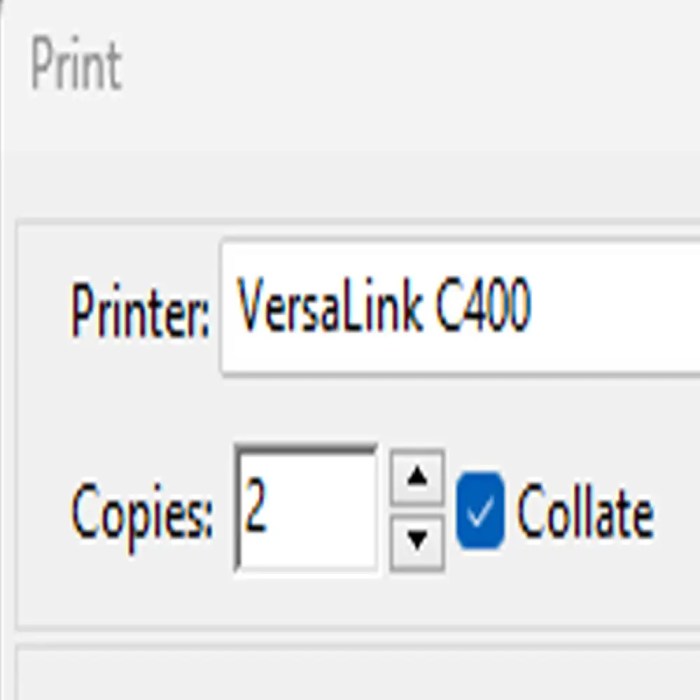
When it comes to collating printed documents, the method you choose can be as crucial as choosing between coffee or tea for a morning pick-me-up. Two primary types of collating are sequential and grouped collating, each serving its own unique purpose depending on the nature of your documents. Let’s dive into the nitty-gritty of these collating types and see which one fits your needs best.
If you’re wondering how to print texts , it can be a straightforward process once you know the steps. Start by connecting your device to the printer, select the text you want to print, and hit the print button. It’s that easy, and soon you’ll have your documents ready in hand.
Sequential and Grouped Collating
Sequential collating and grouped collating are like the yin and yang of the printing world, each with its distinctive flair. Sequential collating arranges pages in the order they will be read, creating a coherent flow for the reader. Imagine you’re printing a novel, and you wouldn’t want the chapters getting mixed up like socks in a dryer, would you? On the other hand, grouped collating collects all the copies of each page together before moving on to the next page, making it ideal for situations where you need multiple sets of the same document.
Think of it as preparing multiple servings of your famous chili—everyone gets the same mouth-watering dish at once!The following examples illustrate where each collating method shines:
- Sequential Collating: Perfect for multi-page reports, presentations, and books where the order matters. Each set is neatly stacked in the correct sequence so that the reader can enjoy the narrative without a hitch.
- Grouped Collating: Ideal for handouts, flyers, and training materials where you need several copies of each page, like multiple sets of instructions for a new gadget. Everyone gets the same page at the same time, ensuring no one is lost in the shuffle.
Understanding the advantages and disadvantages of each type can help you choose wisely. Sequential collating offers a great flow for reading but can be time-consuming if you’re printing dozens of identical sets. Grouped collating, while efficient for multiple copies, might lead to confusion if someone accidentally grabs a mixed-up stack.
“Choosing the right collating method is like choosing the right outfit for an event; it matters how you present yourself!”
By knowing when to use sequential versus grouped collating, you can ensure that your documents are organized and reader-friendly, avoiding chaos amidst the paper stacks. So whether you’re prepping for a presentation or handing out multiple copies, knowing these collating types will keep your printing process smooth like butter on hot toast!
Troubleshooting Collating Issues
When it comes to the fabulous world of printing, nothing can throw a wrench in your plans quite like a collating catastrophe. Imagine, if you will, a dazzling stack of papers that are supposed to be perfectly organized, only to discover they’ve danced their way into a chaotic mess. Fear not, for we are here to help you navigate through the stormy seas of collating confusions and ensure your documents come out as beautifully arranged as your grandma’s prized china.Collating issues can be as frustrating as trying to find a matching sock in a laundry basket of chaos.
But worry not! Identifying common problems and their solutions will have you printing like a pro in no time. Here are the usual suspects that tend to wreak havoc in your collating process along with some nifty ways to set things right.
Common Problems Encountered When Collating Documents
Even the best printers can have a bad day, and collating issues often result from a variety of factors. Here are some common problems you might encounter:
- Misalignment: Pages that just won’t line up properly can lead to a perplexing puzzle of paperwork.
- Page Mismatches: This occurs when pages print in the wrong order, creating a story that makes no sense.
- Double Printing: Sometimes printers get a little too enthusiastic and print the same page more than once.
- Paper Jams: This classic problem can grind your collating efforts to a halt faster than you can say “stuck paper.”
- Incorrect Settings: Whether it’s the wrong paper size or an unselected collate option, this can derail your printing plans entirely.
Solutions for Resolving Collating Errors During Printing
While problems may abound, solutions are just around the corner—like that last slice of pizza at a party. Below are effective strategies to tackle those pesky collating errors head-on:
- Check Printer Settings: Before you hit print, take a moment to ensure that your collate option is selected and that you’re using the correct paper size.
- Realign Your Pages: If misalignment occurs, take a deep breath and realign your pages before the next print run.
- Inspect the Paper Tray: Ensure you’re using the right type of paper and that the tray is loaded correctly, avoiding that dreaded jam.
- Update Printer Drivers: Sometimes, your printer just needs a little TLC in the form of updated drivers to perform at its best.
Tips for Ensuring Accurate and Efficient Collating in Future Prints, What does collate on printer mean
To avoid future collating catastrophes, follow these tried-and-true tips that will help you sail smoothly through your printing endeavors:
- Test Print: Always run a test print of a few pages to ensure everything is functioning correctly before the big print job.
- Use Quality Paper: Investing in high-quality paper can help minimize jamming and misprints, leading to a smoother printing experience.
- Regular Maintenance: Keep your printer clean and well-maintained to prevent common issues that can affect collating.
- Stay Organized: Clearly label your print jobs and collating preferences to avoid any mix-ups during printing.
“Properly collated documents reflect professionalism. Don’t let a printing mishap ruin your reputation!”
Advanced Collating Features

In the fast-paced world of printing, advanced collating features can elevate your printing game from “meh” to “wow!” These nifty functionalities are like the cherry on top of your printing sundae, making workflows smoother than a jazz saxophonist on a Sunday morning. Let’s dive into the cool perks that modern printers have to offer when it comes to collating.Modern printers come equipped with a toolkit of advanced collating functionalities designed to enhance efficiency and user experience.
These features not only save time but also help in organizing printed materials in a way that could make even a meticulous librarian shed a tear of joy. With options ranging from automatic sorting to electronic stapling, the possibilities are endless.
Features of Advanced Collating
A variety of advanced collating functions can significantly improve your printing workflows. Here’s a list of some of the most impressive features available in today’s printers:
- Automatic Sorting: Printers can automatically sort documents into specified orders, such as by date or subject, without requiring manual intervention. Imagine pressing a button and having everything organized for you—it’s like magic!
- Booklet Printing: This feature allows for the printing of booklets that are collated and folded as if a professional printer had done it. Your reports will look so good that they’ll make the Mona Lisa jealous.
- Electronic Stapling: Say goodbye to the days of wrestling with a stapler while trying to assemble documents. Electronic staplers do it for you, ensuring a neat finish while you sip your coffee in style.
- Collating by Page Range: Need to collate specific sections of a document? Modern printers allow you to collate by page range, making it easier to distribute specific information without the hassle.
- Multi-Functionality: Many printers offer the ability to collate documents while scanning or faxing, which can streamline your operations and keep your office running like a well-oiled machine.
- Digital Preview: Before you hit that print button, some printers give you the option to preview how your collated document will look, allowing you to make adjustments on the fly—no more surprises after printing!
The integration of these advanced features can improve printing workflows and efficiency dramatically. They reduce manual labor, minimize human error, and save time—allowing you to focus on more important tasks, like deciding what to binge-watch next on a Friday night. Embrace the power of collating, and watch as your productivity skyrockets like a rocket powered by caffeine!
End of Discussion

In summary, understanding what does collate on printer mean can elevate your printing game to a whole new level. It’s all about making your documents look professional and orderly, saving you time and effort. So next time you’re printing, remember to utilize the collate feature to keep your work neat and organized – because a little organization goes a long way!
Q&A
What is collating in printing?
Collating is the process of arranging printed pages in the correct order, especially for multi-page documents.
Why should I use collate when printing?
Using collate helps keep your documents organized and ensures that each complete set is in the right order.
Can all printers collate?
No, not all printers have a collate feature; it’s more common in multifunction and higher-end printers.
What’s the difference between manual and automatic collating?
Manual collating requires you to sort the pages yourself after printing, while automatic collating does it for you during the printing process.
How do I enable collating on my printer?
To enable collating, go to your printer settings before printing and select the collate option, which may vary by printer model.


